
Demystifying Data Structures, Sorting Algorithms, and Big O Complexity — A Complete Beginner’s Guide
From understanding how data is organized and sorted to mastering time and space complexity, this guide breaks down core DSA concepts using real-world analogies, code examples, and practical use cases.

What is Data Structures and Algorithms?
Data Structures and Algorithms (DSA) is a combined term used in computer science and programming that refers to two fundamental concepts:
Data Structures - How Do We Store Data?
Definition:
A data structure is a way of organizing and storing data in a computer so that it can be accessed and modified efficiently.
Example:
Imagine you're running a library.
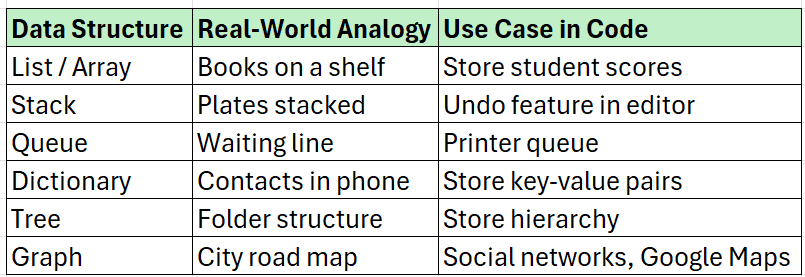
You have books, and you can choose to store them in different ways:
On shelves in a row → like an Array or List
One over the other → like a Stack
Queue at the counter → like a Queue
By category or author → like a Dictionary or HashMap
A branching catalog of books → like a Tree
Books linked to related books → like a Graph
Algorithms - How Do We Process Data?
Definition:
An algorithm is a step-by-step procedure or formula to solve a problem.
Example:
If you want to make a cup of tea, the steps like boiling water, adding tea leaves, pouring into a cup, etc., form an algorithm.
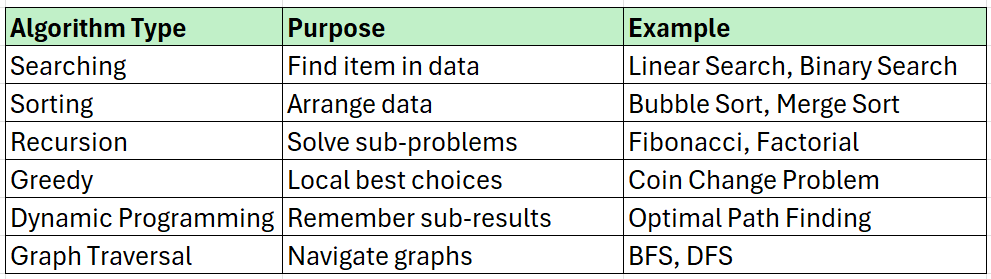
In programming, if you want to find a number in a list, you can:
Check one by one → Linear Search (Simple Algorithm)
Use divide-and-conquer → Binary Search (Efficient Algorithm for sorted lists)
For the stored books in the library (data), you need to:
Find a specific book → Search Algorithm
Sort books by title → Sorting Algorithm
Recommend books based on category → Recommendation Algorithm
Why Data Structures and Algorithms Together?
Because solving a problem efficiently requires both:
"Right Data Structure + Right Algorithm = Optimal Solution"
For example:
Finding the shortest route in Google Maps?
Data Structure: Graph
Algorithm: Dijkstra’s Algorithm
Back button in browser?
Data Structure: Stack
Algorithm: Push and Pop operations
Example in Python
# Problem: Find the maximum number in a list

# Data Structure: List (to store numbers)
numbers = [10, 4, 23, 78, 5]

# Algorithm: Traverse the list and find the maximum
max_num = numbers[0]
for num in numbers:
    if num > max_num:
        max_num = num

print("Maximum number is:", max_num)
Breakdown:
✅
Listis the data structure used to store the numbers.✅ The loop is the algorithm used to find the max value.
Why Is DSA Important?
📱 Used in mobile apps, websites, games, AI, databases
💼 Crucial for interviews (Amazon, Google, Microsoft)
⚙️ Improves performance and memory usage
🧠 Enhances logical and problem-solving skills
Summary

Data Structures (DS): How you store and organize your data.
Algorithms (A): How you process and manipulate that data to solve a problem.
What is Sorting?
Sorting is the process of arranging data in a particular order — usually ascending (1, 2, 3…) or descending (9, 8, 7…).
Where is Sorting Used?
Sorting is mostly applied on Arrays (or Lists in Python).
However, you can also sort:
Linked Lists
Files or records (in databases)
Strings and other collections
✅ Primary Data Structure for Sorting:
Array / List
Why Sorting?
Speeds up searching (like Binary Search requires sorted data)
Organizes data for reporting
Essential in ranking, scheduling, and recommendation systems
Types of Sorting Algorithms
1. Bubble Sort (Simple but slow)
Concept: Repeatedly compare adjacent elements and swap if they are in the wrong order.
Python Code:
def bubble_sort(arr):
    n = len(arr)
    for i in range(n):  # Repeat passes
        for j in range(0, n-i-1):  # Inner loop reduces every pass
            if arr[j] > arr[j+1]:
                arr[j], arr[j+1] = arr[j+1], arr[j]  # Swap
    return arr

print(bubble_sort([5, 1, 4, 2, 8]))
🧠 Use Case: Simple cases, teaching concept
🕒 Time: O(n²)
2. Selection Sort (Select and Place)
Concept: Find the minimum element and place it at the beginning. Repeat for remaining list.
Python Code:
def selection_sort(arr):
    n = len(arr)
    for i in range(n):
        min_index = i
        for j in range(i+1, n):  # Find minimum in remaining list
            if arr[j] < arr[min_index]:
                min_index = j
        arr[i], arr[min_index] = arr[min_index], arr[i]  # Swap
    return arr

print(selection_sort([5, 1, 4, 2, 8]))
🧠 Use Case: Simple logic, less swaps
🕒 Time: O(n²)
3. Insertion Sort (Insert in order)
Concept: Build sorted list one by one by inserting elements at the correct place.
Python Code:
def insertion_sort(arr):
    for i in range(1, len(arr)):
        key = arr[i]
        j = i - 1
        # Move elements greater than key
        while j >= 0 and key < arr[j]:
            arr[j + 1] = arr[j]
            j -= 1
        arr[j + 1] = key
    return arr

print(insertion_sort([5, 1, 4, 2, 8]))
🧠 Use Case: Small lists, nearly sorted
🕒 Time: O(n²)
4. Merge Sort (Divide and Conquer)
Concept: Split array into halves, sort each half, then merge them.
Python Code:
def merge_sort(arr):
    if len(arr) > 1:
        mid = len(arr) // 2
        L = arr[:mid]
        R = arr[mid:]

        merge_sort(L)
        merge_sort(R)

        # Merge sorted halves
        i = j = k = 0
        while i < len(L) and j < len(R):
            if L[i] < R[j]:
                arr[k] = L[i]
                i += 1
            else:
                arr[k] = R[j]
                j += 1
            k += 1

        # Copy leftovers
        while i < len(L):
            arr[k] = L[i]
            i += 1; k += 1
        while j < len(R):
            arr[k] = R[j]
            j += 1; k += 1

    return arr

print(merge_sort([5, 1, 4, 2, 8]))
🧠 Use Case: Large datasets, stable sort
🕒 Time: O(n log n)
5. Quick Sort (Fast Divide and Conquer)
Concept: Pick a pivot, partition the array into smaller and larger elements, recursively sort them.
Python Code:
def quick_sort(arr):
    if len(arr) <= 1:
        return arr
    pivot = arr[0]
    less = [x for x in arr[1:] if x <= pivot]
    greater = [x for x in arr[1:] if x > pivot]
    return quick_sort(less) + [pivot] + quick_sort(greater)

print(quick_sort([5, 1, 4, 2, 8]))
🧠 Use Case: Fastest average case
🕒 Time: Avg: O(n log n), Worst: O(n²)
6. Built-in Sort (Python sort() or sorted())
arr = [5, 1, 4, 2, 8]
arr.sort()
print(arr)
# OR
print(sorted([5, 1, 4, 2, 8]))
🧠 Python uses TimSort (Hybrid of Merge + Insertion Sort)
🕒 Time: O(n log n) in practice
7. Counting Sort — Frequency-Based Sorting
Concept:
Counting Sort works by counting the number of occurrences of each element.
Then it places elements directly into their correct position using these counts.
When to Use:
You know the range of values (like 0 to 100).
All elements are non-negative integers (works best here).
Steps:
Find the maximum value in the array.
Create a
count[]array to store frequency of each number.Modify
count[]to store positions.Build the output array using
count[].
Python Code:
def counting_sort(arr):
    max_val = max(arr)
    count = [0] * (max_val + 1)

    # Step 1: Count occurrences
    for num in arr:
        count[num] += 1

    # Step 2: Modify count to hold positions
    for i in range(1, len(count)):
        count[i] += count[i - 1]

    # Step 3: Build output array
    output = [0] * len(arr)
    for num in reversed(arr):
        output[count[num] - 1] = num
        count[num] -= 1

    return output

print(counting_sort([4, 2, 2, 8, 3, 3, 1]))
Time Complexity:
Best / Average / Worst:
O(n + k)
(n = size of input, k = max element)Space:
O(k)
✅ Stable: Yes
✅ Non-Comparative: Yes
8. Radix Sort — Digit-by-Digit Sorting
Concept:
Radix Sort sorts integers digit by digit, starting from least significant digit (LSD).
It uses a stable sort (usually Counting Sort) at each digit level.
When to Use:
Integers or strings of fixed length.
You want better than O(n log n) time for large integer data.
Steps:
Find the maximum number to know the number of digits.
Sort all numbers based on each digit, from least significant to most significant.
Use a stable sort like Counting Sort at each digit level.
Python Code:
def counting_sort_for_radix(arr, exp):
    n = len(arr)
    output = [0] * n
    count = [0] * 10  # Digits 0-9

    # Count digit frequency
    for i in range(n):
        index = (arr[i] // exp) % 10
        count[index] += 1

    # Modify count
    for i in range(1, 10):
        count[i] += count[i - 1]

    # Build output
    for i in reversed(range(n)):
        index = (arr[i] // exp) % 10
        output[count[index] - 1] = arr[i]
        count[index] -= 1

    return output

def radix_sort(arr):
    max_val = max(arr)
    exp = 1
    while max_val // exp > 0:
        arr = counting_sort_for_radix(arr, exp)
        exp *= 10
    return arr

print(radix_sort([170, 45, 75, 90, 802, 24, 2, 66]))
Time Complexity:
Best / Avg / Worst:
O(n * d)
(n = number of elements, d = number of digits)Space: O(n + k) per pass
Stable: Yes
Non-Comparative: Yes
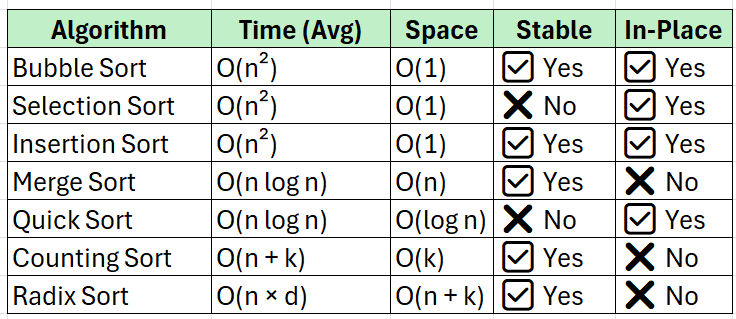
Summary
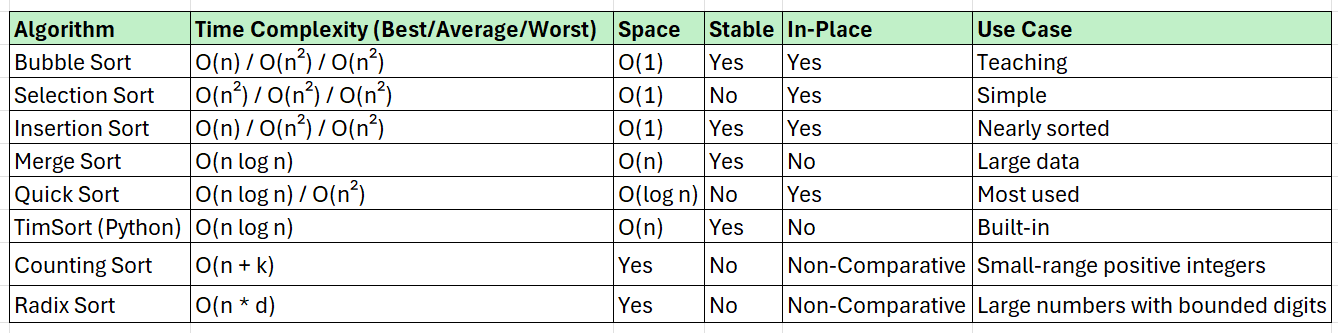
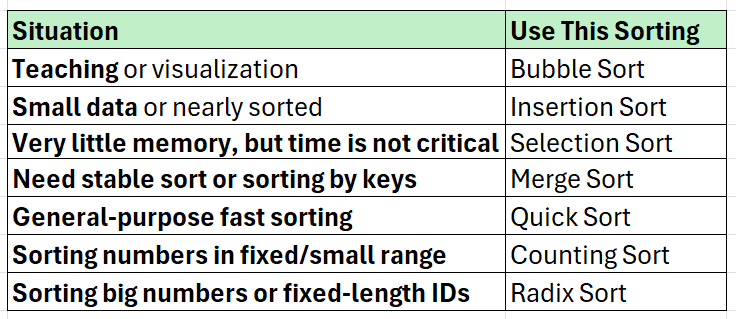
Use cases for all Algorithms
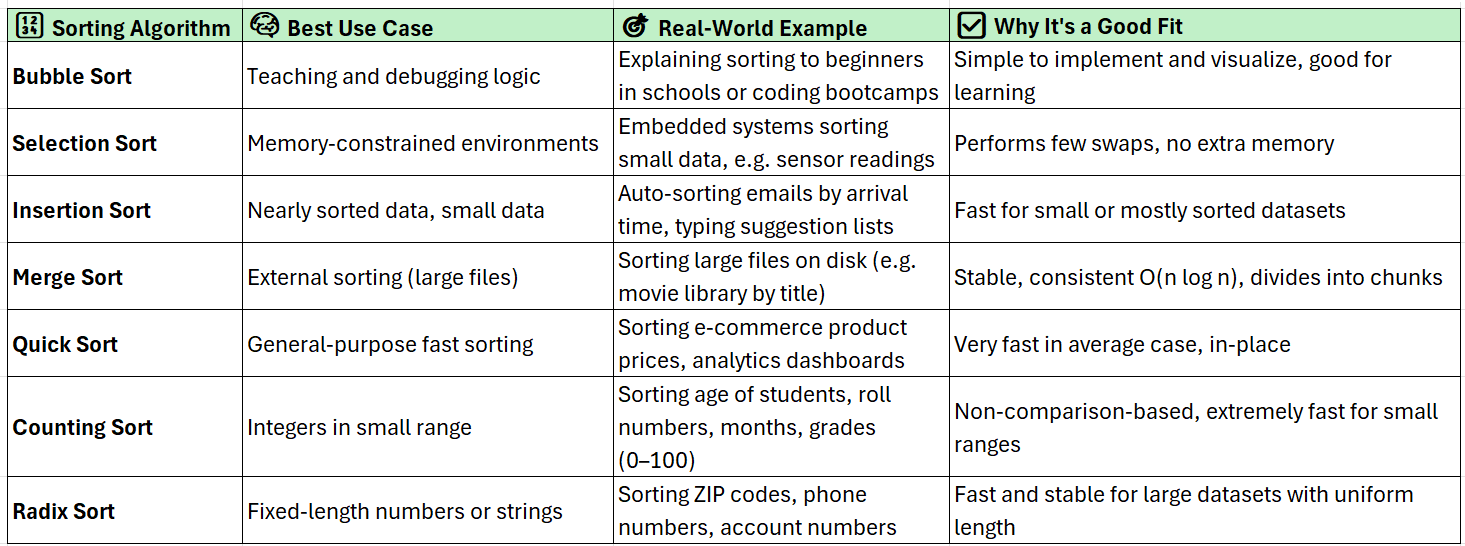
Use Case: A School System
Let’s say you’re building a school management system. Here's how different sorts could help:

Memory and Time Complexity Quick Reference
Final Takeaways — How to Choose the Right Sort
What is Time and Memory Complexity?
When you write code, you want to know:
How fast is it? → Time Complexity
How much memory it uses? → Space (Memory) Complexity
These are measured using Big O Notation like O(n), O(log n), O(n²), etc.
Time Complexity: How Fast Does My Code Run?
Definition:
Time complexity tells you how the runtime of your algorithm increases as the size of the input grows.
Analogy:
Imagine you're searching for a name in a phonebook with 1000 pages.
Go page-by-page (linear) →
O(n)Open to middle, then divide again (binary) →
O(log n)
Simple Example
def print_items(arr):
    for item in arr:
        print(item)
If the list arr has:
10 items → 10 steps
1000 items → 1000 steps
🧠 Time Complexity = O(n)
(n = number of items)
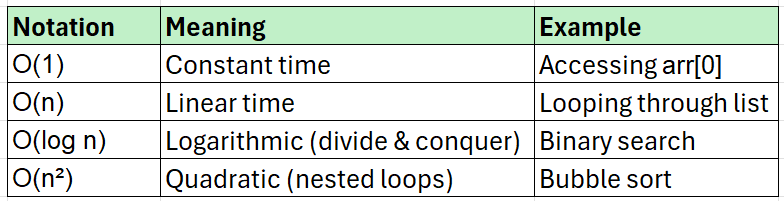
Common Time Complexities
Space (Memory) Complexity: How Much Memory is Used?
Definition:
Space complexity measures how much additional memory your algorithm uses based on input size.
Analogy:
Think of a backpack. If you add more books (data), your bag (memory) gets heavier. Some methods need more space to process data.
Simple Example:
def create_list(n):
    new_list = []
    for i in range(n):
        new_list.append(i)
    return new_list
This function creates a new list of size n, so:
Space increases linearly →
O(n)
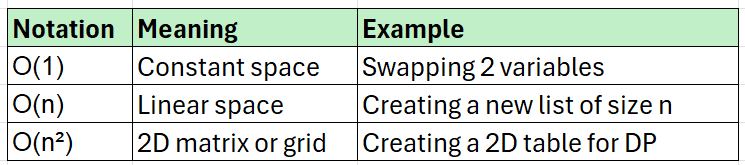
Common Space Complexities
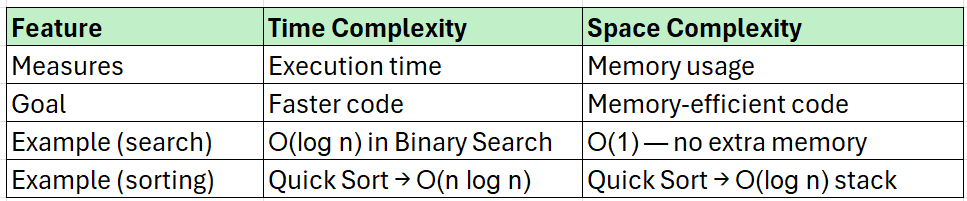
Difference Between Time and Space Complexity
Combined Example
def sum_list(arr):
    total = 0           # O(1) space
    for num in arr:     # O(n) time
        total += num
    return total
Time Complexity =
O(n)(we loop through all items)Space Complexity =
O(1)(we use just one variabletotal)
Final Tip
When analyzing an algorithm:
Check how many operations grow with input → Time.
Check how many extra variables/data structures are created → Space.
Conclusion
Wrapping It All Together — Think Logically, Code Smartly
Data Structures and Algorithms form the foundation of computer science — they’re the tools that turn logic into power. By understanding different data structures and choosing the right algorithm, you can solve real-world problems more efficiently and elegantly.
Whether you're:
Picking between Bubble Sort or Quick Sort,
Sorting student records or zip codes,
Or wondering whether to optimize for speed or memory…
The key is not just writing working code, but writing smart, scalable code.
Learn to ask:
“What structure fits my data?”
“Which algorithm scales better?”
“Can I trade memory for speed or vice versa?”
By mastering these basics — Sorting + Time + Space + Use Cases — you're not only preparing for interviews or exams, but also training your mind to think like an engineer.
For more in-depth technical insights and articles, feel free to explore:
Girish Central
LinkTree: GirishHub – A single hub for all my content, resources, and online presence.
LinkedIn: Girish LinkedIn – Connect with me for professional insights, updates, and networking.
Ebasiq
Substack: ebasiq by Girish – In-depth articles on AI, Python, and technology trends.
Technical Blog: Ebasiq Blog – Dive into technical guides and coding tutorials.
GitHub Code Repository: Girish GitHub Repos – Access practical Python, AI/ML, Full Stack and coding examples.
YouTube Channel: Ebasiq YouTube Channel – Watch tutorials and tech videos to enhance your skills.
Instagram: Ebasiq Instagram – Follow for quick tips, updates, and engaging tech content.
GirishBlogBox
Substack: Girish BlogBlox – Thought-provoking articles and personal reflections.
Personal Blog: Girish - BlogBox – A mix of personal stories, experiences, and insights.
Ganitham Guru
Substack: Ganitham Guru – Explore the beauty of Vedic mathematics, Ancient Mathematics, Modern Mathematics and beyond.
Mathematics Blog: Ganitham Guru – Simplified mathematics concepts and tips for learners.